


 Dean propose cet homebrew de lancement de backup: MultiMan
MultiMan permet de lancer des backups de jeux PS3, PSX et PS2 Classic mais permet également de jouer à divers émulateurs, lire des vidéos et contient un gestionnaire de fichiers.
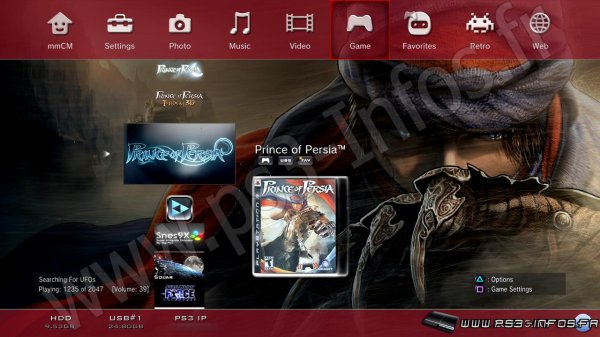
Pour jouer aux backups PS2 Classic (ou votre backup PS2 normal encrypté), vous devez d'abord installer "PS2 Classics Placeholder" (par CaptainCPS-X) (disponible plus bas), et chacun des jeux classic placés dans le dossier /dev_hdd0/PS2ISO, avec un dossier par jeu.
Si vous n'avez pas de carte mémoire, mM va en créer une dans un sous dossier SAVEDATA dans le dossier du jeu.
Voici la structure à utiliser :
"/dev_hdd0/PS2ISO/nom du jeu" (mais vous n'aurez pas les pochettes)
ou
"/dev_hdd0/PS2ISO/[SCUS-97194] NFL GameDay 2003" (vous aurez les pochettes)
Dans ce dossier, placez votre PS2 Classic encrypté sous le nom ISO.BIN.ENC (vous pouvez encrypter un .ISO ou .BIN d'un jeu PS2 avec PS2 Classics GUI), si vous avez une pochette vous pouvez la mettre sous le nom COVER.JPG.
Et si vous avez déjà une sauvegarde, vous pouvez faire un sous dossier SAVEDATA et placer les fichiers SCEVMC0.VME et SCEVMC1.VME dedans.
Pour la liste de compatibilité avec les jeux PS2 Classic, rendez vous sur cette page.
multiMAN v04.81.00
* Added support for CFW 4.81 (CEX)
* Added update for Stealth version
multiMAN v04.80.00
* Added support for CFW 4.80
multiMAN v04.78.02/04.78.03
* Fixed naming of FLASH/LV1/LV2 exports for CFW 4.66/4.76/4.78
* Fixed EBOOT.BIN/SPRX patching for CFW 4.66/4.76/4.78
* Updated Showtime/Movian to latest Bleeding Edge (04.99.812) - http://movian.tv
* Updated stealthMAN (multiMAN Stealth version) to 04.78.02
multiMAN v04.78.02
* Fixed naming of FLASH/LV1/LV2 exports for CFW 4.66/4.76/4.78
* Fixed EBOOT.BIN/SPRX patching for CFW 4.66/4.76/4.78
* Updated Showtime/Movian to latest Bleeding Edge (04.99.812) - http://movian.tv
* Updated stealthMAN (multiMAN Stealth version) to 04.78.02
multiMAN v04.78.01
* Fixed crash when scanning for /net_host (ps3netsrv) games
multiMAN v04.78.00
* Added support for CFW 4.78
* Updated Japanese translation by Kyan_dudl
Version 4.76.00
Added support for CFW 4.76
Fixed BD-Mirror for 4.75 DEX
Version 4.75.55
(multiman a 5 ans)
Support for CFW 4.75 CEX/DEX
webMAN v1.43 available with support for 4.75
lastGAME14 available in the web column with support for 4.75
Fixed/Removed unused DYNAREC references
Version 04.75.00
- Ajout du support de CFW 4.75
Version 04.70.00
* Added support for CFW 4.70
* Updated Danish translation by ChopstiX
* Updated Movian/Showtime for mM to 4.9.430
* 200 PS3 covers added to the online server (total of 9200 PS3 covers available)
Version 04.66.10 (10/01/2015)
- Correction des covers de les jeux ISO splittés
- Correction de l'image de fond des jeux ISO
- Correction de quelques erreurs introduitent en .08
Version 04.66.09 (05/01/2015)
- Correction d'une erreur mineure (mmCM) (régression depuis la 04.66.07)
- Ajout d'une invitation à lancer multiMAN si mmCM se trouve lui même en mode non-cobra mode (corrige l'erreur de @tiefputin1)
Version 04.66.08 (04/01/2015)
- Correction des erreurs lors de l'utilisation de plus d'un disque dur externe USB avec les CFW's Cobra (4.46-4.66+)
- Correction des erreurs avec les blocages/blackscreen/disques invalides de certains homebrews d'autres erreurs diverses (CFW 4.65CEX/DEX et 4.66CEX)
- Suppression des patchs de habib et ajout de deux autres différents pour augmenter la compatibilité
- Les jeux au format JB sur disque dur USB formaté en FAT32 seront monté sur /dev_usb (et non sur /dev_usb***) - cette erreur apparait en CFW 4.20. /dev_usb est toujours le primier disque dur usb que les managers ps3 utilisent. Lorsque qu'il arrive que votre jeu n'est pas sur le premier/plus rapide des disques dur usb, cela cause des problèmes. "Reset USB Bus" a été introduit dans multiMAN il y a plus d'un an, mais il est maintenant ajouté à mmCM également, qui ne réinitialise pas le bus actuellement.
Version 04.66.06 (01/12/2014)
- Correction des erreurs avec les jeux comme "Shadow of Mordor" - Il peut être lancé au format JB/dossier depuis le DD interne/externe maintenant.
- Les erreurs avec les autres jeux au format JB/Dossier sont sans doute également corrigées.
- Cette correction est valable pour tous les CFW's standard et les CFW's Cobra (4.46-4.66).
- /app_home n'est pas redirigé intentionnellement vers /dev_bdvd pour les CFW's Cobra
Version 04.66.05 (29/11/2014)
- Correction d’erreurs avec les CFW's Cobra 4.66 (mmCM et webMAN)
Version 04.66.04 (23/11/2014)
It is aimed to cover all configurations for better compatibility. This one will utilize the "USB Patch" option in "Settings" (used back in 3.41) and will affect the way BD-Mirror option is applied and when AIOMOD is used. The actual change is only with point 4) when both options are enabled.
COBRA firmwares (only affects games on external USB HDD):
1) [-] BD-Mirror | [-] USB Patch (Both options disabled) - mmCM will act the same as before (all versions up to 04.66.02)
2) [X] BD-Mirror | [-] USB Patch (Only BD-Mirror selected) - (no effect) Same as before
3) [-] BD-Mirror | [X] USB Patch (Only USB patch selected) - (no effect) Same as before
4) [X] BD-Mirror | [X] USB Patch (Both options enabled) - mM will use the old bd-mirror method (moving /PS3_GAME to the root of the USB HDD)
STANDARD firmwares:
1) [-] BD-Mirror | [-] USB Patch (Both options disabled) - multiMAN will act the same as before (all versions up to 04.66.02)
2) [X] BD-Mirror | [-] USB Patch (Only BD-Mirror selected) - Same as before (AIOMOD.BIN is used for USB games and libfs.sprx is used for internal HDD games)
3) [-] BD-Mirror | [X] USB Patch (Only USB patch selected) - (no effect) Same as before
4) [X] BD-Mirror | [X] USB Patch (Both options enabled) - AIOMOD.BIN is not used. mM will use the old bd-mirror method for USB games (moving /PS3_GAME to the root of the USB HDD) and libfs.sprx is used for internal HDD games)
This will make mM fully compatible with older and newer cobra/non-cobra firmwares, providing all possible options for all games/environments. By using option 4) on standard firmwares the user won't have to manually delete/rename AIOMOD.BIN, because it is needed by some games and other require the plain old bd-mirror method.
For example, to make the "Mordor" game work on Cobra from external USB HDD you will need option 4) enabled (both BD-Mirror and USB Patch options enabled for the game in settings).
After you update to 04.66.04 nothing should change for most of you. If you experience issues with some external USB HDD games - try options 2) and 4). When reporting problems, please make sure that you load multiMAN/mmCM after CLEAN REBOOT and do not use other apps/patches before launching the game. If you use any app that disables syscalls/psn patchers/etc - I cannot guarantee anything.
Version 04.66.03
- Ajout du "BD-Mirror" sur les firmwares Cobra pour les jeux externes sur HDD USB FAT32
- Correction des erreurs de black-screen-games pour les jeux récents (HDD externe seulement)
- Mise à jour de libfs.sprx et de explorer_plugin.sprx (pour un meilleur support sans disque)
Version 04.66.02
- Ajout du support pour les CFW 4.65 DEX CFW
- Ajout du spoof 4.66 pour les anciens firmwares (ne pas utiliser avec le Habib 4.65 1.02 Cobra)
- Inclus Showtime 4.7.494
Version 04.66.00
- Ajout du support pour les CFW 4.66
- Ajout du spoof 4.66 pour les anciens firmwares
Version 04.65.02
- Le support pour les CFW 4.65 du "Direct-Disc-Access" a été ajouté à multiMAN 04.65.02. Vous avez maintenant la possibilité d'accéder à tous les types de disques optique. Ceci inclus les disques de jeu PS1, disques PS2 discs (pour backup/conversion en "classics"), disques AVCHD (pour lecture dans Showtime) ou Blu-ray (pour backup et décryptage ensuite sur un PC), incluant n'importe quel CD/DVD DATA avec musiques/vidéos.
Version 04.65.01
- Ajout du support du CFW 4.65 (CEX).
Version 04.60.00
- Ajout du support de CFW 4.60.
Version 04.55.01
Fixed USB bus scanning and reset for CFW 4.53 and 4.55
Updated Showtime for mM to version 04.05.302
Fixed few other things
Version 04.55.00
- Ajout du support pour les CFW 4.55 (quand ils existeront )
)
- Ajout d'une option de spoof 4.55 dans mmCM (ne pas utiliser avec les CFW autres que 4.46)
- Correction du téléchargement de fichier depuis sendspace dans la colonne WEB
Version 04.53.04
- Les noms des jeux locaux PS3 en format ISO sont correctement affichés (depuis PARAM.SFO)
- Les noms des jeux PS3 présent sur le réseau ou sur une partition NTFS sont correctement affichés (depuis PARAM.SFO) après que vous l'ayez lancé au moins une fois
- Les jeux PS3 au format ISO sur un lecteur NTFS ont maintenant le background et le cover affichés (si il a été lancé au moins une fois avant)
- Ajout du support pour la vérification des mise à jour de jeux pour les jeux au format ISO sur le réseau ou sur une partition NTFS
- Le dernier jeu/vidéo lancé (pas par reseau/ntfs) sera donné à webMAN pour le chargement automatique au prochain lancement de la console (rendant lastGAME plus ou moins obsolète)
- Lors du scanning des contenus, mmCM préparera les données pour webMAN également (info NTFS, images et param.sfo)
- Une fois lancé, mM/mmCM va re-scanner vos jeux et mettra en cache les images et autres fichiers
- Léger changement fait pour rendre le "title_id" de mM indépendant (dans le cas où vous le changeriez pour celui par défaut BLES80608)
- Le téléchargement des mises à jour mM/mmCM est maintenant indépendant du "titre"/"nom"
- Dans le mode mmCM, dans la colonne HOME, vous avez maintenant une option "Scan connected NTFS USB drives". Dans le cas où vous n'auriez pas connecté votre lecteur avant de lancer mmCM, vous pouvez utiliser cette option pour rafraichir le contenu de votre lecteur NTFS.
Version 04.53.03
Pour les CFW Cobra7 (CEX seulement) :
- Ajout du support des jeux PS3 au format ISO sur des disques dur NTFS (/PS3ISO).
- Ajout du support des jeux PS1 au format ISO/BIN+CUE sur des disques dur NTFS (/PSXISO).
- Ajout du support des films bluray au format ISO sur des disques dur NTFS (/BDISO).
- Ajout du support des films dvd video au format ISO sur des disques dur NTFS (/DVDISO).
Vous aurez besoin de démarrer multiman avec votre disque dur déjà branché.
Version 04.53.02
Added proper detection of COBRA7 firmwares (4.46-4.53)
Added "Check for updates" for local PS3 games in ISO format
Added check when loading local/network PS3 games in ISO format if installed game update requires higher firmware version and fixes sprx/self/eboot files
Version 04.53.01
* Added support for 4.53 CEX CFW (tested)
* Fixed covers/backgrounds for network PS3 games in JB/folder format
* Added spoof to version 4.53 (COBRA7 firmwares only)
On Cobra7 compatible firmwares - make sure to delete mM's USRDIR/cache folder (if you want to get PIC1.PNG covers for network JB/folder games).
Network (/net_host#/***PS3***/) games now show ICON0.PNG, PIC1.PNG and a cover if available.
Version 04.50.04
- Ajout du support du CFW 3.50 DEX
- Ajout du support du CFW mix Cobra/Rogero
- Ajout d'une option dans la colonne HOME "Switch entre mmCm et multiMAN".
- Ajout du support du chargement de jeux via le réseau dans le format JB/FOLDER grâce à ps3netsrv.
- Dans le mode Cobra/mmCm, toutes les fonctions marchent (testé).
To use network servers you must add them in mM/mmCM in Settings ("Network Servers") and have ps3netsrv running on your PC to share the drive/folder with your games/iso/videos/etc.
Version 04.50.01
- Remplace l'icone SingStar par lastGAME
- Affiche l'IDPS de la NAND/NOR (EIDO) et de la mémoire LV2 (spoofée/vraie) dans 'System Information'
- Correction de lastGAME pour les jeux externes/usb avec l'option bd-mirror.
Version 04.50.00
- Ajout du support du CFW 4.50
* PS1/PS2/PS3 games, BD-MIRROR INT/EXT, BD-MOVIE REGION CHANGE/DYNAREC SUPPORT
* Disc-less mode: Icon changed from BD disc to "folder icon"
Version 04.46.04
Support le Cobra ODE en MCU 1.0, 1.1, 1.2 , 1.3 et supérieur.
- Support du téléchargement de jaquettes.
- Support du téléchargement de thèmes.
- Inclus showtime pour 04.53.536 par Andreas Oman
- Changement de la méthode exitspawn (merci à kakaroto pour la suggestion) - donc RetroArch et les autres apps sont intégrés dans mM sur OFW + ODDE.
Version 04.46.03
* Added Croatian (Hrvatski) language - translation by Robi666
* Added Slovak (Slovenčina) language - translation by lubek76
* Updated Czech (Čeština) language - translation by varinek and Mutagen
* Fixed some issues with downloading covers/updates
Version 04.46.02
* Added proper support for 4.46 REX/DEX (bd-mirror for internal/external games)
Version 04.46.00
- Ajout du support du CFW 4.46
- Mise à jour de la traduction turque
- Correction de la région de la lecture des films bluray en cfw 4.41
Version 04.40.00
Added support for 4.41 CFW
All specific features (like BD Movie region Change, BD-Mirror, DYNAREC, PS1 BIN+ISO backups, PS2 Classics, discless, etc) work.
Version 04.30.00
- Ajout du support des CFW 4.40
- Ajout du support des backups PS2 classic, placés dans /dev_hdd0/PS2ISO
Version 04.20.04
* Improved discless compatibility (even more) on 3.55/4.21/4.30CEX firmwares
* A BD-DISC icon with [PlayStation(R)3] text will appear in XMB to replace /app_home/PS3_GAME entry
* Tested few games, which didn't work discless before and now work just fine (like LEGO:Indiana Jones, LBP2 and others)
* Upon launch mM will try to restore default LV2 environment by resetting syscalls 35, 36, 37, 141, 142, 600, 604 (this should fix problems when mM is launched after Iris)
Version 04.20.03
* Added support for 4.30DEX CFW (REBUG) (TBA)
* Added support for PS1 BIN+CUE (using ps1_emu/netemu) for 3.55DEX, 4.21DEX and 4.30DEX
* Added DynaRec support: New option in Settings "Enable DYNAREC"
* DYNAREC support for 3.55CEX/DEX, 4.21CEX/DEX, 4.30CEX/DEX, 4.31CEX
* Fixed few minor issues in 4x2 and 8x4 modes (refreshing the game title when insert/ejecting a PS3 game disc)
* Fixed a very rare bug in mmOS when icon names/texts are getting corrupted
DYNAREC support tested on 4.21REX and 4.30ROGERO with ps3sx_Beta.pkg which is enough to assume that the implementation is proper. Thanks to Ing. Pereira for the htab info and PeteUK for the testing. All offsets can be found in my source below so Ing. Pereira can port his app for other firmwares, too. Also there is an easier way to detect all CFW firmwares and I posted about it at the end of this post.
=============================================
Here is a slightly modified PS3SX:
* You can install it on any mM supported firmware (3.55CEX/DEX, 4.21CEX/DEX, 4.30CEX/DEX, 4.31CEX)
* The configuration file is USRDIR/CF.ini
* Comes with bios and all paths set properly where the default ROM path is /dev_hdd0/PSXISO
* EBOOT.BIN calls RELOAD.SELF so you can boot PS3SX directly from multiMAN
* It has VERY POOR compatibility but shows that dynarec is working on all firmwares.
PS3SX [BETA].pkg (5.95MB)
http://www.sendspace.com/file/h0dsht
You can enable DynaRec in mM's settings and directly load PS3SX from mM's GAME column. Thanks to aldostools for the cover. Developers can use this dynarec option in mM if they wish to test their apps in this environment.
=============================================
The implementation in mM is different than IngPereira's approach, because it doesn't use the 0x700000 area for the payload and the patches, there are no issues with PKG files and works on all firmwares. Still the kammy data for the hvsc redirections is used, but dynarec's usage is greatly simplified by an "On/Off" option in mM.
I'm just saying this because some morons will go again with their idiotic comments about copy/pasting. Parts of the mM code is here, along with info how to make it work on all firmwares.
Version 04.20.00
- Introduction d'un nouveau payload mM qui rend mM indépendant et facile à porter à divers firmwares.
- Supporte seulement les versions 3.55 CEX/DEX, 4.21 CEX/DEX, 4.30 CEX, 4.31 CEX
- L'option émulation de BD ROM dans les paramètres peut être réglée à activé/désactivé au lieu de "Hermes" et "Standard".
C'est mieux que Standard ou Hermes
- Ce payload écrase 252 octets de texte dans la mémoire LV2 (et pas 4000 octets de code comme les autres payloads), ça n'utilise aucun syscalls et n'est pas dépendant de fonctions de firmwares, il s'exécute rapidement et améliore les performances.
* Added option in settings "Redirect /app_home":
--- Disable (/app_home will not be mounted at all)
--- Enable (/app_home as used in previous versions - points to the game - for disc-less)
--- Toolbox (on Rogero firmwares with pre-installed toolbox if you play from discs only - it allows you to return to stealthMAN without restart)
* For 3.55DEX and 4.21DEX mM now supports split-games, adds better disc-less compatibility and also allows loading of PS1 backups in BIN+CUE format from internal/external.
* IMPROVED DISC-LESS COMPATIBILITY:
The new payload allows for some tweaks and there is 80% chance that games that didn't work disc-less will now work.
Version 04.19.03 - 04.19.04
* Added support for BIN+CUE PS1 games with AUDIO tracks
* Added Smooth/Full-Screen options for PS1 games in "Settings"
* Added 4 new translation labels
* Updated Showtime to 04.01.480
* When creating backups from PS1 discs, CUE+BIN+toc files will be created
* Improved PS1 CUE files processing
* Updated 8 language files
Version 04.19.02
* Added support for 4.31CFW
* Added support for creating ISO files from PS1 game discs
* Improved support for PS1 ISO/BIN/IMG/MDF
Version 04.19.00
* Added initial support for single-disc PS1 ISO/BIN backups (/PSXISO /PSXGAMES folders)
* PS1 ISO/BIN backups will show in the RETRO column
* PS1 ISO/BIN backups compatibility is much lower than burned PS1 CD backups
* Credits for the PS1 EMU patches go solely to Estwald/Hermes
Memory cards are stored per game in the same folder as the game. Covers can be named as the iso/bin with .jpg (3264x3264 max) or .png (416x414 max) extension (or as COVER.JPG (3264x3264 max) when using PSXGAMES folder with game-name subfolder).
Don't forget that pressing [SQUARE] in the RETRO column groups content (emulator ROMS, PS1/PS2/PSP).
Version 04.18.05
Adds additional support/fixes to Cobra CFW 4.30
--Dongle Required for Cobra Features
Version 4.18.04
Added initial Support to Cobra 4.30 CFW
it seems to improves some games compatibility
The last cobra update was from Nov 7th and since these multiMAN features have bee added to mmCM as well.
Version 04.18.03
* Changed method for scanning of control-info for eboot.bin/self/sprx files
* [* Install Package Function] won't allow adding the same PKG twice and allows 'deselecting' when "Standard" method is used
There are some other changes/improvements, too.
Version 04.18.01
* Greatly improved graphics rendering (visuals) when mM is used in 480p/576p/720p
* Browsing Blu-ray, AVCHD and DVD-Video discs from the BD/DVD icon in Video column now works
* Removed duplicates of BD/AVCHD/DVD-Video entries in the Video column
* Fixed mouse-control when mmOS is the first display mode after mM starts
* Toolbox/IPF from /app_home will be activated when you quit mM on 4.30 Rogero CFWs (not if you load a game)
Version 04.18.00
* Added support for downloadable packages/files in the Web column
* Fixed some minor issues (rename/delete) when using "Game Settings" menu (after using L1/R1 to switch games)
* Reworked some core functions and improved mM's performance even more
* Added back "Install Package Files Method" to Settings for 4.30 firmwares
* Removed pulsing of the currently selected entry (works better with some fonts)
* "Game Settings" menu now loads faster
* If the background game-verification didn't complete and you had to wait for "Verifying..." it will now happen only once per game. The result of the verification is now remembered
***
I rewrote and optimized a lot of functions in this version and you will notice the difference.
Version 04.17.04
* Visual improvements
* Added SD/MS/CF entries in Retro
* Fade-in for game backgrounds
* Some other improvements related to copying/scanning/verifying/etc
* multiMAN "minimal"/"bare" version available (read below)
Version 04.17.00
* Improved overall speed of all functions and GUI
* Data Test/Verify functions now take fraction of the time compared to previous versions
* Improved 'Verifying data' of USB games by a factor of 50
* Improved scan before copying a game/folder
* Improved loading folders in mmOS
* Improved just a bit deleting games/folders
* Greatly improved loading content when browsing PS3 HDD/USB drives in game modes
* Loading Retro ROM/Video/Photo and ISO folders while browsing PS3 HDD/USB is now about 15 times faster
* Added "Friendly" name option in "Settings"/"Network Servers" for /net_host parties
* Fixed over-scrolling when browsing through large number of entries
* Increased max number of entries in game modes by 50% to 3072 (from 2048)
* Improved speed when copying games/files from/to USB HDDs
* Improved speed when copying games from PS3 Game Discs
* Improved speed when copying/browsing folders via FTP (LIST/MLSD)
* Added support for up to 99 pkg files in the [* Install Package Files] queue
* [* Install Package Files] function will scan /dev_hdd0/PKGTMP and will MOVE the queued pkg files from this folder (saving HDD space by not copying to temp location)
* mmOS will now honor the "Verify USB Games" setting when starting games from icons/shortcuts/game-folder
* Scanning for active USB storage devices is now performed in the background and will speed up loading games on 4.**CFW
* Verifying games in now performed in the background (when possible) to avoid delays when loading games
Version 04.16.03
* Improved overall speed of all functions and GUI
* Data Test/Verify functions now take fraction of the time compared to previous versions
* Improved 'Verifying data' of USB games by a factor of 50
* Improved scan before copying a game/folder
* Improved loading folders in mmOS
* Improved just a bit deleting games/folders
* Greatly improved loading content when browsing PS3 HDD/USB drives in game modes
* Loading Retro ROM/Video/Photo and ISO folders while browsing PS3 HDD/USB is now about 15 times faster
* Added "Friendly" name option in "Settings"/"Network Servers" for /net_host parties
* Fixed over-scrolling when browsing through large number of entries
* Increased max number of entries in game modes by 50% to 3072 (from 2048)
* The first time you load this version it will take 2-3 seconds longer, but next mM starts will show the GUI in a split second
Version 04.16.02
A show-off version so you can find out what speeds multiMAN is capable of
Scanning for games is greatly improved and is 40-80% faster now
Improved "Remote Acess" functions (support for Left/Right stick mouse controls in remote mmOS)
Added support for new mmRAS 01.02.00
Some other general improvements
Version 04.16.00
* Improved quality and speed of remote access screen rendering. Depending on server PS3 resolution the image is rendered as follows:
- 1920x1080 -> 960x720, 1280x720 -> 960x720, 720x480 -> 720x480, 720x576 -> 720x576 (all with PAR 16:9)
* Added support for new functions in mmRAS
* When using remote access to another PS3 both must be on mM 04.16.00
* Added new lines in translation files
* Added new linux (x86) version of ps3netsrv
* Updated Showtime (for mM and standalone) to 4.1.307
* Fixed a bug preventing mM from fixing 80010009 error
Version 04.15.00
* Updated PC application "ps3netsrv" to support fast folder-data retrieval
* Greatly improved loading of remote /net_host folders (up to 4096 entries in mmOS and 2048 in other modes)
* Greatly improved loading of remote Retro ROMs folders with covers
* Added support to access remote PS3 system in mmOS or in game modes via /net_host
- You can access all data of a remote PS3 to view/play photo/music/video files, transfer files/folders (and load ISO games/movies PS3/PSX/DVD/BD if used with Cobra CFW)
* Added option in "Settings" - "Connect to Another PS3" - it allows full remote control (screen/pad) of another PS3 running multiMAN 04.15.00 and later
* Added option in "Settings" - "Remote Access Permissions" (Disable/Files/Screen/Full) to restrict remote connnections to your PS3
* Added support for mmRAS - PC application by Aldo (aldostools) which allows remote access to your PS3 (screen/pad) while running multiMAN
* Screenshot feature in multiMAN (START+R2) will now save screens as JPEG.
Version 04.14.00
Changes related only to 4.20-4.30 CEX/DEX CFWs:
BD-Mirror:
* BD-Mirror option now supports USB HDDs mounted as /dev_usb000 to /dev_usb127
* BD-Mirror option uses different approach now and doesn't move the PS3_GAME folder of USB games and doesn't modify the mount table
* After using BD-Mirror for USB games, the usb drive is still accessible in XMB (Video/Music/Photo/Saves)
* Improved disc-less support with BD-Mirror option enabled
USB Ports issues:
* When using more than one USB device mM will disconnect/reconnect them from/to the USB bus in the proper order
* This fixes games that crash when started from USB when multiple devices are connected
NTFS/PFS usage:
* It is now possible to use any NTFS usb drive without configuring its Vendor/Device IDs in USB.CFG
* When switching to NTFS/PFS mode use only one USB HDD connected (mM supports up to 2 partitions: FAT32+NTFS, NTFS+NTFS, FAT32+FAT32)
* To access the contents of NTFS drives use mmOS and /pvd_usb000 /pvd_usb001 (games from NTFS drives won't show in other display modes)
Other:
* Better support for data CD/DVD/BD discs and improved "Enable Direct Disc Access" function
* Improved BD-Mirror function for games on internal HDD
* Games started from mmOS icons/shortcuts handle BD-Mirror/Ext.Game Data options properly
* Online update server updated (5320 PS3 game covers and 3420 PS1/PS2 game covers)
* Updated showTIME media player (for mM) to version 04.01.264
* Updated 8 translation files
Install Package Files (standalone application):
* Supports split pkg files named in the following format:
filename.pkg.0 -> filename.pkg.63
filename.pkg.001 -> filename.pkg.064
filename.pkg.66600 -> filename.pkg.66663
* Upon launch/refresh the following folders are scanned:
/dev_usb***/
/dev_usb***/PKG
/dev_usb***/packages
/dev_hdd0/PKG
/dev_hdd0/packages
* Updated stDISC application (better drive reset timing and support for 4.30CFW)
* Updated gameDATA, bdRESET and lastGAME applications to support 4.30CFW
* Updated showTIME media player (standalone) to version 04.01.264 (CEX/DEX)
Version 04.12.00
Added full support for Rogero 4.30CFW Version 2.00
- LV1 peek/poke support
- PS1 disc backups support
- Direct Disc Access support
Added new function in "Home" column - "* Install Package Files"
Added new option in "Settings" - "Install Package Files Method"
- User can pick from either "Standard" or "PSN Style (bubble)" modes
- Bubble mode shows installable packages as PSN downloaded content in Game column (or under Rebug's Package Manager/PSN Content)
- To select a package file (*.pkg):
-- Use [* Install Package Files] option in Home column or
-- double click on a pkg file in mmOS/File Manager (when "bubble" method is used the PS3 will reboot)
Fixed copying of AVCHD/Blu-ray movie backups from Video column
NOTE: You will need this version installed BEFORE upgrading to Rogero 4.30 v2 as the firmware DOES NOT have a "* Install Package Files" XMB entry like the other CFWs.
Version 04.11.13
* Ajout d'une vérification du firmware requis pour l'EBOOT.BIN (à l'offset 0x428) qui va vous proposer de fixer celui-ci pour votre version actuelle.
* Cela va corriger les erreurs 80010009 survenant sur les jeux 4.20 à 4.31 sans mise à jour si l'EBOOT.BIN est chiffré avec la révision 4.20/0x1C de la clé ou inférieure.
* Testé avec Need for Speed : Most Wanted sur 4.21 REX sans installer la mise à jour 01.01 du jeu.
* Cela va probablement corriger des erreurs sur le CFW Rogero 4.30 si les jeux 4.35 sont publiés chiffrés avec les clés 4.30.
Version 04.11.12
Fixed LV1 peek/poke for 4.21REX in DEX mode + DEX lv2_kernel
Added back IDPS display in "System Information"
Added preliminary support for 4.30CFW with LV1 peek/poke syscalls (sc 8/9) or lv1 mmap patch (hvsc 114)
(if such CFW is released then direct-disc-access/PS1 disc backups should work)
Increased number of supported simultaneous FTP transfers to 8
FTP user/password can be anything
Added support for "Change BD-Movie Region" function for 4.30CFW
Updated Showtime to 04.01.224
Version 04.11.11
* Added option in "Settings" - Fix Broken Blu-ray Movie Playback
The function will rewrite DRL/CRL hashes if there is a mismatch and will fix "Playback Prohibited" error on 3.41/3.55/4.21/4.30 firmwares.
Option also availabe in control console via telnet to port 8080 (rcp vtrm / rcp vtrm update)
* Credits to graf_chokolo and glevand for all their work!
* Fixed option for fixing blu-ray playback to appear on 4.30FW
Version 04.10.00
* Added full support for 4.21REX (REBUG) firmware
* Added support for 4.21REX in DEX full mode (DEX flash + DEX lv2 kernel)
* Added support for PS1 disc backups for 4.21REX CFW in DEX/DEX mode
* Added support for direct-disc-access for 4.21REX CFW in DEX/DEX mode (data CD/DVD/BD discs)
* Added support for flashing 256MB NAND *.EID0.NANDBIN backups
* Users with broken BD drives can use 4.21REX in DEX mode with fake BDEMU stick/image for 100% game compatibility
IMPORTANT NOTE: If you're using DEX mode in 4.21REX, use this CEX version of mM (do not install the reguar DEX mM which is only for official dex firmwares).
Version 04.09.00
* Updated online covers database (also fixed Fifa13/Maiden/Dishonored covers)
* Updated gameDATA3, lastGAME3 and bdRESET3 to support 4.30CFW
* Updated showTIME to 04.01.208 (standalone PKG and showTIME for mM)
* Added hidden option in options.bin "kid_protection" (to control access to settings/mmos)
Version 04.08.00
* Added proper support for [Hermes] for 4.21CEX ROGERO (SC-8)
* Fixed issue with loading split games from external USB HDD
* Improved support in lastGAME, gameDATA and bdRESET applications
Version 04.07.01
--- Updated 11 of the translations
--- Added support for Hermes payload for 4.21CEX CFW (SC-10)
--- Updated lastGAME app to version 3.00 (with Hermes support)
--- Updated gameDATA app to version 3.00
Version 04.07.00
Added full support for BD - Mirror for games on internal HDD for 4.21 CFW
Added support for 4.21 CFW CEX spoofed to 4.25
Fixed an issue with loading PS1 disc backups
Fixed some text typos and translation for "temperature" strings
Version 04.06.02
* Added option in "Settings" - "Show Temperature Data" in Clock area (Disable/Enable/Auto) (thanks to Mysis and 3141card_)
Version 04.06.00
multiMAN celebrates 2 years. CONGRATULATIONS!
Added support for 4.21CFW (CEX) (syscall 6-10 required):
"Standard" BD-Emulator option (sc36) (Hermes not supported yet)
Direct Disc Access (LV1&LV2 patched for Storage Manager access)
Raw access to optical media (PS1 backups & Showtime access to BD/DVD/CDs)
BD-Movie Region Changer
BD-Mirror for INT/EXT games
Multiman Cobra Manager mmCM (mmOS) version 04.05.00
Added support for ZIP files (4GB ZIP filesize limit)
Added support for extracting ZIP files in mmOS (unzip supports subfolders, too); User can enter the target folder name to extract the zip in.
--- Unzip in the same folder: ([O]->Unzip Here)
--- Unzip in a different folder: ([O]->Copy -> (go to a different folder) -> [O]->Unzip Here)
--- Double-click a .zip file - extracts archive to TEMP location and opens target folder
------ TIP: To extract into current folder enter single dot . for folder name;
Added support for installable ZIP packages when filename is in special format (double click on such special zip in mmOS):
--- PS3~dev_hdd0~GAMES~BLES12345~dlc.zip will prompt the user to install the contents in /dev_hdd0/GAMES/BLES12345/dlc folder
--- PS3~dev_blind~test.zip -> will make mM enable WRITE access to dev_flash and install the contents of the .zip in /dev_blind/test (/dev_flash/test) folder (use with caution)
------ TIP#1: Special ZIP naming convention: prefix is "PS3", "/" is replaced by "~"
------ TIP#2: This approach can be used to restore backups of /dev_hdd0/home or install patch-fixes or other data
Added support for RetroArch 0.9.7 new cores - launching retro ROMs from "Retro" column
Added support for launching retro ROMs in ZIP format from local or network locations (/dev_hdd0, /dev_usb***, /net_host*)
Added support for new emulator cores:
--- Mednafen's PCE for PS3 (pce)
--- Mednafen's WonderSwan Color for PS3 (wsw)
--- PRBOOM for PS3 (prb) (plays Doom, Doom II, Final Doom and other Doom IWAD mods)
--- Gambatte
Added new options in "options.ini" to define paths to new cores, roms and covers (pce, wsw, prb folders in ./ROMS and ./covers_retro)
The the following improvements are for those using the Cobra-USB dongle:
Added support for PIC1.PNG background images for local (internal HDD and external USB HDD) PS3 games in ISO format
Added support for coverart for local PS3 games in ISO format
Added support for game icons (ICON0.PNG) to mmOS Desktop shortcuts for local PS3 games in ISO format
Fixed sort order of Game column when only PS3 games in ISO format are listed
Fixed issue with Retro column (when detaching USB HDD while scanning for ROMs)
Multiman Cobra Manager mmCM (mmOS) version 04.04.04
- Improved speed (2 to 3 times faster) when copying folders from NTFS drives (async write + larger I/O buffer)
- Fixed wrongly issued error message when copying 4+GB files to USB (when source file is being split)
- Fixed access permissions/attributes of split file segments and LV1/LV2/FLASH-dumps when copying to USB
- Added support for launching NPDRM executables (SELF files) with k_license=NULL (zeroes) / RetroArch emulators
- Added support for dumping NOR/NAND flash to /dev_usb000 via HEX Viewer mode (SELECT->START->LV2->LV1->FLASH)
- Added support for writing EID0 sector (TARGET_ID + 192 bytes only) from *.EID0.NORBIN and
*.EID0.NANDBIN files generated by mM and processed by c2d.exe to change Region/Target
- ISO folders (BDISO, DVDISO, PS2ISO, PS3ISO, PSXISO, PSPISO) will be automatically created only when mM is used with supported configuration
- Changed: “Game Updates” function will find updates up to 3.60 firmware (update must be patched for 3.55CFW before installing)
- Changed: “Game Settings” menu will display PIC1.PNG thumbnail if game folder was accessed in mmOS mode (PS3GAME.BG1 present under PS3_GAME)
Multiman Cobra Manager mmCM (mmOS) version 04.04.03
Changed function "Game Updates" (different server; function will not work in older versions)
Changed function "Download Game Covers" (different server; function will not work in older versions)
Added option "Blu-ray Movie Disc Region" in "Settings" to change current PS3 region/targetid for movie compatibility (for non-Cobra/TB 3.55CFW)
Added support for ICON1.PAM in themes
Multiman Cobra Manager mmCM (mmOS) version 04.04.02
* Changed folder "Paste" behavior in mmOS - when overwriting existing folder the destination will not be deleted before pasting
* Added 3 key combos in mmOS (for full list please refer to "navigation.txt"):
- SELECT+(CROSS hold) - Select All
- SELECT+(L2/R2) - Scroll to top/bottom of folder/file list
* Extended "FTP Server" options in "Settings": Disable / Enable (1 min. TO)...(9 min. TO) / (No timeout) to set ftp connection timeouts
* Added 4.20 to "Firmware Version" option in "Settings"
Multiman Cobra Manager mmCM (mmOS) version 04.04.01
* Added support for desktop shortcuts to games:
- Name of the game, Icon of the game used for the shortcut created to game's EBOOT.BIN
* Added background image for game folders (PIC1.PNG used if present)
* Added "Open Location" in context menu [O] for shortcuts
* Added path information when deleting games from internal/external HDD
* Added feature to keep desktop icons when shortcuts are renamed
* Added support for multiple shortcuts to files/folders with the same name (Windows alike - adding (1), (2)... (64) to the shortcut name)
* Added support for REBUG 3.55.2 and OFW/MFW 3.41 to the "BD-Mirror" option for (BSG) game backups in internal HDD
* Updated bdRESET to version 2.2 (to reset BD-Mirror state for internal HDD)
Multiman Cobra Manager mmCM (mmOS) version 04.04.00
* Fixed something that annoyed some users of 5x4x5, 4x2 and XBDM display modes: After restart (or going to mmOS and back) game modes 5x4x5, 4x2 and XBDM will display the last selected entry (game, video, music, photo) and will *not* reset to dash mode
* Added option to "Default Display Mode" setting: [Disable]; If there is no display-mode-lock it will make mM start in the last used display mode
* FTP session timeout set to 1 minute
mmOS related:
* Added context menu when desktop is selected (to Refresh, Create New Folder, Show Desktop, Reset mmOS, Restore Wallpaper)
* Added "Permissions" to context menu when single folder is selected (to reset folder access permissions)
* Double clicking on .p3t (PS3 theme) will copy/install the file/theme to PS3 XMB themes system folder (/dev_hdd0/theme); user can later install it from XMB
* Added support for creating shortcuts to /net_host PC shares
* Folders created on the desktop now open properly
* Desktop shortcuts to /ps3_home/video, music and photo now have proper icons and open the virtual folder and not the /dev_hdd0/* one
* Desktop shortucts to games/executables (EBOOT.BIN/.SELF) can be used to boot external apps or mount games
Game Compatibility:
CFWs 3.55 Related ( KMEAW / REBUG / ROGERO )
- Improved compatibility for the so-called "Black-Screen-Games" (BSG) which *until now* required the "BD-Mirror" option and worked ONLY from external usb HDD (otherwise game would lock/loop/error during load).
- Now users of the listed firmwares can use the "BD-Mirror" option for game backups stored in the INTERNAL HDD. It may improve the compatibility of over 100 games (some older titles, some newer),
for example AC1 / Colin Dirt 1 / Prince Of Persia / CoD / MW / Tomb Raider, incl. titles which had sound issues.
- A partial list of some games that may gain from the new option can be found here:
http://pastie.org/pastes/4115732/text
(by GotIt4Free / http://www.tortuga-cove.com)
- It is now possible to set "BD-Mirror" option for games in Internal HDD and it enables the new functionality. The option works both with PS3 Game Disc in the tray and in discless mode from /app_home.
- The option is available in the "Game Settings" menu for each game in the list
Multiman Cobra Manager mmCM (mmOS) version 04.03.03
* Fixed rare issue causing mmOS to lock/stall when browsing /ps3_home subfolders
* Added "Reset Desktop" option to mmOS home menu (resets icons positions and closes all windows)
* Added "Set as Wallpaper" / "Restore Wallpaper" to mmOS context menu when single image (jpg/png) is selected; affects all display modes
* Added better visualization when moving icons around the desktop with L3 (Windows alike)
* Changed visualization of selected/hovered desktop icons (a bit slicker)
Multiman Cobra Manager mmCM (mmOS) version 04.03.02
- Extended desktop content to 48 icons (6 system and 42 user defined); system icons cannot be moved/renamed/deleted
- Added ability to arrange desktop icons - press L3 over an icon to move it to a free placeholder and then press L3 to place it
- Fixed issue with playing/loading 2GB+ files with Showtime from /net_host or NTFS USB HDD (file wrongly cached to /dev_hdd1 when there isn't enough space there)
- Fixed issue when USB.CFG is not present in USRDIR - now warning is issued when user enables PFS mode
- Fixed loading of last open folders in mmOS - now /pvd_usb* folders from NTFS drives are not reloaded
Multiman Cobra Manager mmCM (mmOS) version 04.03.01
Added option to mmOS context menu: [Paste as Link] to create shadow copy of one folder copied to Clipboard
Added ability to create desktop shortcuts to devices (hdd, usb, ms, cf, sdhc)
Added free space information for devices when browsing PS3 Root
Added information to the window status bar about selected entries and their size
Added "Home" menu with options to Enable Direct Disc Access Mode, to Restart/Quit to XMB, to Restart/Shutdown PS3
Added key-combo "SELECT+TRIANGLE" to minimize current window (holding the combo will minimize all windows) (press or hold [SQUARE] to switch/restore)
- Fixed issue with loading Blu-ray movies in ISO format which contain jacket images in BDMV/META/DL folder (introduced in 04.02.04)
- FTP Service: For best performance use ACTIVE mode and 2 concurrent file transfers
- Improved loading of PSX games burned to CD (no eject/insert procedure)
- Recorded non-PSX CD/DVD/DVD-Video discs:
--- No need to enable Direct Disc Access Mode *if disc is inserted while mM is running* (for best results insert the disc after mM is loaded)
--- It allows users easier access to content on recorded discs (video/music/pictures/data) in mM and spawned applications (Showtime)
* Added support for CFW 4.81 (CEX)
* Added update for Stealth version
multiMAN v04.80.00
* Added support for CFW 4.80
multiMAN v04.78.02/04.78.03
* Fixed naming of FLASH/LV1/LV2 exports for CFW 4.66/4.76/4.78
* Fixed EBOOT.BIN/SPRX patching for CFW 4.66/4.76/4.78
* Updated Showtime/Movian to latest Bleeding Edge (04.99.812) - http://movian.tv
* Updated stealthMAN (multiMAN Stealth version) to 04.78.02
multiMAN v04.78.02
* Fixed naming of FLASH/LV1/LV2 exports for CFW 4.66/4.76/4.78
* Fixed EBOOT.BIN/SPRX patching for CFW 4.66/4.76/4.78
* Updated Showtime/Movian to latest Bleeding Edge (04.99.812) - http://movian.tv
* Updated stealthMAN (multiMAN Stealth version) to 04.78.02
multiMAN v04.78.01
* Fixed crash when scanning for /net_host (ps3netsrv) games
multiMAN v04.78.00
* Added support for CFW 4.78
* Updated Japanese translation by Kyan_dudl
Version 4.76.00
Added support for CFW 4.76
Fixed BD-Mirror for 4.75 DEX
Version 4.75.55
(multiman a 5 ans)
Support for CFW 4.75 CEX/DEX
webMAN v1.43 available with support for 4.75
lastGAME14 available in the web column with support for 4.75
Fixed/Removed unused DYNAREC references
Version 04.75.00
- Ajout du support de CFW 4.75
Version 04.70.00
* Added support for CFW 4.70
* Updated Danish translation by ChopstiX
* Updated Movian/Showtime for mM to 4.9.430
* 200 PS3 covers added to the online server (total of 9200 PS3 covers available)
Version 04.66.10 (10/01/2015)
- Correction des covers de les jeux ISO splittés
- Correction de l'image de fond des jeux ISO
- Correction de quelques erreurs introduitent en .08
Version 04.66.09 (05/01/2015)
- Correction d'une erreur mineure (mmCM) (régression depuis la 04.66.07)
- Ajout d'une invitation à lancer multiMAN si mmCM se trouve lui même en mode non-cobra mode (corrige l'erreur de @tiefputin1)
Version 04.66.08 (04/01/2015)
- Correction des erreurs lors de l'utilisation de plus d'un disque dur externe USB avec les CFW's Cobra (4.46-4.66+)
- Correction des erreurs avec les blocages/blackscreen/disques invalides de certains homebrews d'autres erreurs diverses (CFW 4.65CEX/DEX et 4.66CEX)
- Suppression des patchs de habib et ajout de deux autres différents pour augmenter la compatibilité
- Les jeux au format JB sur disque dur USB formaté en FAT32 seront monté sur /dev_usb (et non sur /dev_usb***) - cette erreur apparait en CFW 4.20. /dev_usb est toujours le primier disque dur usb que les managers ps3 utilisent. Lorsque qu'il arrive que votre jeu n'est pas sur le premier/plus rapide des disques dur usb, cela cause des problèmes. "Reset USB Bus" a été introduit dans multiMAN il y a plus d'un an, mais il est maintenant ajouté à mmCM également, qui ne réinitialise pas le bus actuellement.
Version 04.66.06 (01/12/2014)
- Correction des erreurs avec les jeux comme "Shadow of Mordor" - Il peut être lancé au format JB/dossier depuis le DD interne/externe maintenant.
- Les erreurs avec les autres jeux au format JB/Dossier sont sans doute également corrigées.
- Cette correction est valable pour tous les CFW's standard et les CFW's Cobra (4.46-4.66).
- /app_home n'est pas redirigé intentionnellement vers /dev_bdvd pour les CFW's Cobra
Version 04.66.05 (29/11/2014)
- Correction d’erreurs avec les CFW's Cobra 4.66 (mmCM et webMAN)
Version 04.66.04 (23/11/2014)
It is aimed to cover all configurations for better compatibility. This one will utilize the "USB Patch" option in "Settings" (used back in 3.41) and will affect the way BD-Mirror option is applied and when AIOMOD is used. The actual change is only with point 4) when both options are enabled.
COBRA firmwares (only affects games on external USB HDD):
1) [-] BD-Mirror | [-] USB Patch (Both options disabled) - mmCM will act the same as before (all versions up to 04.66.02)
2) [X] BD-Mirror | [-] USB Patch (Only BD-Mirror selected) - (no effect) Same as before
3) [-] BD-Mirror | [X] USB Patch (Only USB patch selected) - (no effect) Same as before
4) [X] BD-Mirror | [X] USB Patch (Both options enabled) - mM will use the old bd-mirror method (moving /PS3_GAME to the root of the USB HDD)
STANDARD firmwares:
1) [-] BD-Mirror | [-] USB Patch (Both options disabled) - multiMAN will act the same as before (all versions up to 04.66.02)
2) [X] BD-Mirror | [-] USB Patch (Only BD-Mirror selected) - Same as before (AIOMOD.BIN is used for USB games and libfs.sprx is used for internal HDD games)
3) [-] BD-Mirror | [X] USB Patch (Only USB patch selected) - (no effect) Same as before
4) [X] BD-Mirror | [X] USB Patch (Both options enabled) - AIOMOD.BIN is not used. mM will use the old bd-mirror method for USB games (moving /PS3_GAME to the root of the USB HDD) and libfs.sprx is used for internal HDD games)
This will make mM fully compatible with older and newer cobra/non-cobra firmwares, providing all possible options for all games/environments. By using option 4) on standard firmwares the user won't have to manually delete/rename AIOMOD.BIN, because it is needed by some games and other require the plain old bd-mirror method.
For example, to make the "Mordor" game work on Cobra from external USB HDD you will need option 4) enabled (both BD-Mirror and USB Patch options enabled for the game in settings).
After you update to 04.66.04 nothing should change for most of you. If you experience issues with some external USB HDD games - try options 2) and 4). When reporting problems, please make sure that you load multiMAN/mmCM after CLEAN REBOOT and do not use other apps/patches before launching the game. If you use any app that disables syscalls/psn patchers/etc - I cannot guarantee anything.
Version 04.66.03
- Ajout du "BD-Mirror" sur les firmwares Cobra pour les jeux externes sur HDD USB FAT32
- Correction des erreurs de black-screen-games pour les jeux récents (HDD externe seulement)
- Mise à jour de libfs.sprx et de explorer_plugin.sprx (pour un meilleur support sans disque)
Version 04.66.02
- Ajout du support pour les CFW 4.65 DEX CFW
- Ajout du spoof 4.66 pour les anciens firmwares (ne pas utiliser avec le Habib 4.65 1.02 Cobra)
- Inclus Showtime 4.7.494
Version 04.66.00
- Ajout du support pour les CFW 4.66
- Ajout du spoof 4.66 pour les anciens firmwares
Version 04.65.02
- Le support pour les CFW 4.65 du "Direct-Disc-Access" a été ajouté à multiMAN 04.65.02. Vous avez maintenant la possibilité d'accéder à tous les types de disques optique. Ceci inclus les disques de jeu PS1, disques PS2 discs (pour backup/conversion en "classics"), disques AVCHD (pour lecture dans Showtime) ou Blu-ray (pour backup et décryptage ensuite sur un PC), incluant n'importe quel CD/DVD DATA avec musiques/vidéos.
Version 04.65.01
- Ajout du support du CFW 4.65 (CEX).
Version 04.60.00
- Ajout du support de CFW 4.60.
Version 04.55.01
Fixed USB bus scanning and reset for CFW 4.53 and 4.55
Updated Showtime for mM to version 04.05.302
Fixed few other things
Version 04.55.00
- Ajout du support pour les CFW 4.55 (quand ils existeront
)- Ajout d'une option de spoof 4.55 dans mmCM (ne pas utiliser avec les CFW autres que 4.46)
- Correction du téléchargement de fichier depuis sendspace dans la colonne WEB
Version 04.53.04
- Les noms des jeux locaux PS3 en format ISO sont correctement affichés (depuis PARAM.SFO)
- Les noms des jeux PS3 présent sur le réseau ou sur une partition NTFS sont correctement affichés (depuis PARAM.SFO) après que vous l'ayez lancé au moins une fois
- Les jeux PS3 au format ISO sur un lecteur NTFS ont maintenant le background et le cover affichés (si il a été lancé au moins une fois avant)
- Ajout du support pour la vérification des mise à jour de jeux pour les jeux au format ISO sur le réseau ou sur une partition NTFS
- Le dernier jeu/vidéo lancé (pas par reseau/ntfs) sera donné à webMAN pour le chargement automatique au prochain lancement de la console (rendant lastGAME plus ou moins obsolète)
- Lors du scanning des contenus, mmCM préparera les données pour webMAN également (info NTFS, images et param.sfo)
- Une fois lancé, mM/mmCM va re-scanner vos jeux et mettra en cache les images et autres fichiers
- Léger changement fait pour rendre le "title_id" de mM indépendant (dans le cas où vous le changeriez pour celui par défaut BLES80608)
- Le téléchargement des mises à jour mM/mmCM est maintenant indépendant du "titre"/"nom"
- Dans le mode mmCM, dans la colonne HOME, vous avez maintenant une option "Scan connected NTFS USB drives". Dans le cas où vous n'auriez pas connecté votre lecteur avant de lancer mmCM, vous pouvez utiliser cette option pour rafraichir le contenu de votre lecteur NTFS.
Version 04.53.03
Pour les CFW Cobra7 (CEX seulement) :
- Ajout du support des jeux PS3 au format ISO sur des disques dur NTFS (/PS3ISO).
- Ajout du support des jeux PS1 au format ISO/BIN+CUE sur des disques dur NTFS (/PSXISO).
- Ajout du support des films bluray au format ISO sur des disques dur NTFS (/BDISO).
- Ajout du support des films dvd video au format ISO sur des disques dur NTFS (/DVDISO).
Vous aurez besoin de démarrer multiman avec votre disque dur déjà branché.
Version 04.53.02
Added proper detection of COBRA7 firmwares (4.46-4.53)
Added "Check for updates" for local PS3 games in ISO format
Added check when loading local/network PS3 games in ISO format if installed game update requires higher firmware version and fixes sprx/self/eboot files
Version 04.53.01
* Added support for 4.53 CEX CFW (tested)
* Fixed covers/backgrounds for network PS3 games in JB/folder format
* Added spoof to version 4.53 (COBRA7 firmwares only)
On Cobra7 compatible firmwares - make sure to delete mM's USRDIR/cache folder (if you want to get PIC1.PNG covers for network JB/folder games).
Network (/net_host#/***PS3***/) games now show ICON0.PNG, PIC1.PNG and a cover if available.
Version 04.50.04
- Ajout du support du CFW 3.50 DEX
- Ajout du support du CFW mix Cobra/Rogero
- Ajout d'une option dans la colonne HOME "Switch entre mmCm et multiMAN".
- Ajout du support du chargement de jeux via le réseau dans le format JB/FOLDER grâce à ps3netsrv.
- Dans le mode Cobra/mmCm, toutes les fonctions marchent (testé).
To use network servers you must add them in mM/mmCM in Settings ("Network Servers") and have ps3netsrv running on your PC to share the drive/folder with your games/iso/videos/etc.
Version 04.50.01
- Remplace l'icone SingStar par lastGAME
- Affiche l'IDPS de la NAND/NOR (EIDO) et de la mémoire LV2 (spoofée/vraie) dans 'System Information'
- Correction de lastGAME pour les jeux externes/usb avec l'option bd-mirror.
Version 04.50.00
- Ajout du support du CFW 4.50
* PS1/PS2/PS3 games, BD-MIRROR INT/EXT, BD-MOVIE REGION CHANGE/DYNAREC SUPPORT
* Disc-less mode: Icon changed from BD disc to "folder icon"
Version 04.46.04
Support le Cobra ODE en MCU 1.0, 1.1, 1.2 , 1.3 et supérieur.
- Support du téléchargement de jaquettes.
- Support du téléchargement de thèmes.
- Inclus showtime pour 04.53.536 par Andreas Oman
- Changement de la méthode exitspawn (merci à kakaroto pour la suggestion) - donc RetroArch et les autres apps sont intégrés dans mM sur OFW + ODDE.
Version 04.46.03
* Added Croatian (Hrvatski) language - translation by Robi666
* Added Slovak (Slovenčina) language - translation by lubek76
* Updated Czech (Čeština) language - translation by varinek and Mutagen
* Fixed some issues with downloading covers/updates
Version 04.46.02
* Added proper support for 4.46 REX/DEX (bd-mirror for internal/external games)
Version 04.46.00
- Ajout du support du CFW 4.46
- Mise à jour de la traduction turque
- Correction de la région de la lecture des films bluray en cfw 4.41
Version 04.40.00
Added support for 4.41 CFW
All specific features (like BD Movie region Change, BD-Mirror, DYNAREC, PS1 BIN+ISO backups, PS2 Classics, discless, etc) work.
Version 04.30.00
- Ajout du support des CFW 4.40
- Ajout du support des backups PS2 classic, placés dans /dev_hdd0/PS2ISO
Version 04.20.04
* Improved discless compatibility (even more) on 3.55/4.21/4.30CEX firmwares
* A BD-DISC icon with [PlayStation(R)3] text will appear in XMB to replace /app_home/PS3_GAME entry
* Tested few games, which didn't work discless before and now work just fine (like LEGO:Indiana Jones, LBP2 and others)
* Upon launch mM will try to restore default LV2 environment by resetting syscalls 35, 36, 37, 141, 142, 600, 604 (this should fix problems when mM is launched after Iris)
Version 04.20.03
* Added support for 4.30DEX CFW (REBUG) (TBA)
* Added support for PS1 BIN+CUE (using ps1_emu/netemu) for 3.55DEX, 4.21DEX and 4.30DEX
* Added DynaRec support: New option in Settings "Enable DYNAREC"
* DYNAREC support for 3.55CEX/DEX, 4.21CEX/DEX, 4.30CEX/DEX, 4.31CEX
* Fixed few minor issues in 4x2 and 8x4 modes (refreshing the game title when insert/ejecting a PS3 game disc)
* Fixed a very rare bug in mmOS when icon names/texts are getting corrupted
DYNAREC support tested on 4.21REX and 4.30ROGERO with ps3sx_Beta.pkg which is enough to assume that the implementation is proper. Thanks to Ing. Pereira for the htab info and PeteUK for the testing. All offsets can be found in my source below so Ing. Pereira can port his app for other firmwares, too. Also there is an easier way to detect all CFW firmwares and I posted about it at the end of this post.
=============================================
Here is a slightly modified PS3SX:
* You can install it on any mM supported firmware (3.55CEX/DEX, 4.21CEX/DEX, 4.30CEX/DEX, 4.31CEX)
* The configuration file is USRDIR/CF.ini
* Comes with bios and all paths set properly where the default ROM path is /dev_hdd0/PSXISO
* EBOOT.BIN calls RELOAD.SELF so you can boot PS3SX directly from multiMAN
* It has VERY POOR compatibility but shows that dynarec is working on all firmwares.
PS3SX [BETA].pkg (5.95MB)
http://www.sendspace.com/file/h0dsht
You can enable DynaRec in mM's settings and directly load PS3SX from mM's GAME column. Thanks to aldostools for the cover. Developers can use this dynarec option in mM if they wish to test their apps in this environment.
=============================================
The implementation in mM is different than IngPereira's approach, because it doesn't use the 0x700000 area for the payload and the patches, there are no issues with PKG files and works on all firmwares. Still the kammy data for the hvsc redirections is used, but dynarec's usage is greatly simplified by an "On/Off" option in mM.
I'm just saying this because some morons will go again with their idiotic comments about copy/pasting. Parts of the mM code is here, along with info how to make it work on all firmwares.
Version 04.20.00
- Introduction d'un nouveau payload mM qui rend mM indépendant et facile à porter à divers firmwares.
- Supporte seulement les versions 3.55 CEX/DEX, 4.21 CEX/DEX, 4.30 CEX, 4.31 CEX
- L'option émulation de BD ROM dans les paramètres peut être réglée à activé/désactivé au lieu de "Hermes" et "Standard".
C'est mieux que Standard ou Hermes
- Ce payload écrase 252 octets de texte dans la mémoire LV2 (et pas 4000 octets de code comme les autres payloads), ça n'utilise aucun syscalls et n'est pas dépendant de fonctions de firmwares, il s'exécute rapidement et améliore les performances.
* Added option in settings "Redirect /app_home":
--- Disable (/app_home will not be mounted at all)
--- Enable (/app_home as used in previous versions - points to the game - for disc-less)
--- Toolbox (on Rogero firmwares with pre-installed toolbox if you play from discs only - it allows you to return to stealthMAN without restart)
* For 3.55DEX and 4.21DEX mM now supports split-games, adds better disc-less compatibility and also allows loading of PS1 backups in BIN+CUE format from internal/external.
* IMPROVED DISC-LESS COMPATIBILITY:
The new payload allows for some tweaks and there is 80% chance that games that didn't work disc-less will now work.
Version 04.19.03 - 04.19.04
* Added support for BIN+CUE PS1 games with AUDIO tracks
* Added Smooth/Full-Screen options for PS1 games in "Settings"
* Added 4 new translation labels
* Updated Showtime to 04.01.480
* When creating backups from PS1 discs, CUE+BIN+toc files will be created
* Improved PS1 CUE files processing
* Updated 8 language files
Version 04.19.02
* Added support for 4.31CFW
* Added support for creating ISO files from PS1 game discs
* Improved support for PS1 ISO/BIN/IMG/MDF
Version 04.19.00
* Added initial support for single-disc PS1 ISO/BIN backups (/PSXISO /PSXGAMES folders)
* PS1 ISO/BIN backups will show in the RETRO column
* PS1 ISO/BIN backups compatibility is much lower than burned PS1 CD backups
* Credits for the PS1 EMU patches go solely to Estwald/Hermes
Memory cards are stored per game in the same folder as the game. Covers can be named as the iso/bin with .jpg (3264x3264 max) or .png (416x414 max) extension (or as COVER.JPG (3264x3264 max) when using PSXGAMES folder with game-name subfolder).
Don't forget that pressing [SQUARE] in the RETRO column groups content (emulator ROMS, PS1/PS2/PSP).
Version 04.18.05
Adds additional support/fixes to Cobra CFW 4.30
--Dongle Required for Cobra Features
Version 4.18.04
Added initial Support to Cobra 4.30 CFW
it seems to improves some games compatibility
The last cobra update was from Nov 7th and since these multiMAN features have bee added to mmCM as well.
Version 04.18.03
* Changed method for scanning of control-info for eboot.bin/self/sprx files
* [* Install Package Function] won't allow adding the same PKG twice and allows 'deselecting' when "Standard" method is used
There are some other changes/improvements, too.
Version 04.18.01
* Greatly improved graphics rendering (visuals) when mM is used in 480p/576p/720p
* Browsing Blu-ray, AVCHD and DVD-Video discs from the BD/DVD icon in Video column now works
* Removed duplicates of BD/AVCHD/DVD-Video entries in the Video column
* Fixed mouse-control when mmOS is the first display mode after mM starts
* Toolbox/IPF from /app_home will be activated when you quit mM on 4.30 Rogero CFWs (not if you load a game)
Version 04.18.00
* Added support for downloadable packages/files in the Web column
* Fixed some minor issues (rename/delete) when using "Game Settings" menu (after using L1/R1 to switch games)
* Reworked some core functions and improved mM's performance even more
* Added back "Install Package Files Method" to Settings for 4.30 firmwares
* Removed pulsing of the currently selected entry (works better with some fonts)
* "Game Settings" menu now loads faster
* If the background game-verification didn't complete and you had to wait for "Verifying..." it will now happen only once per game. The result of the verification is now remembered
***
I rewrote and optimized a lot of functions in this version and you will notice the difference.
Version 04.17.04
* Visual improvements
* Added SD/MS/CF entries in Retro
* Fade-in for game backgrounds
* Some other improvements related to copying/scanning/verifying/etc
* multiMAN "minimal"/"bare" version available (read below)
Version 04.17.00
* Improved overall speed of all functions and GUI
* Data Test/Verify functions now take fraction of the time compared to previous versions
* Improved 'Verifying data' of USB games by a factor of 50
* Improved scan before copying a game/folder
* Improved loading folders in mmOS
* Improved just a bit deleting games/folders
* Greatly improved loading content when browsing PS3 HDD/USB drives in game modes
* Loading Retro ROM/Video/Photo and ISO folders while browsing PS3 HDD/USB is now about 15 times faster
* Added "Friendly" name option in "Settings"/"Network Servers" for /net_host parties
* Fixed over-scrolling when browsing through large number of entries
* Increased max number of entries in game modes by 50% to 3072 (from 2048)
* Improved speed when copying games/files from/to USB HDDs
* Improved speed when copying games from PS3 Game Discs
* Improved speed when copying/browsing folders via FTP (LIST/MLSD)
* Added support for up to 99 pkg files in the [* Install Package Files] queue
* [* Install Package Files] function will scan /dev_hdd0/PKGTMP and will MOVE the queued pkg files from this folder (saving HDD space by not copying to temp location)
* mmOS will now honor the "Verify USB Games" setting when starting games from icons/shortcuts/game-folder
* Scanning for active USB storage devices is now performed in the background and will speed up loading games on 4.**CFW
* Verifying games in now performed in the background (when possible) to avoid delays when loading games
Version 04.16.03
* Improved overall speed of all functions and GUI
* Data Test/Verify functions now take fraction of the time compared to previous versions
* Improved 'Verifying data' of USB games by a factor of 50
* Improved scan before copying a game/folder
* Improved loading folders in mmOS
* Improved just a bit deleting games/folders
* Greatly improved loading content when browsing PS3 HDD/USB drives in game modes
* Loading Retro ROM/Video/Photo and ISO folders while browsing PS3 HDD/USB is now about 15 times faster
* Added "Friendly" name option in "Settings"/"Network Servers" for /net_host parties
* Fixed over-scrolling when browsing through large number of entries
* Increased max number of entries in game modes by 50% to 3072 (from 2048)
* The first time you load this version it will take 2-3 seconds longer, but next mM starts will show the GUI in a split second
Version 04.16.02
A show-off version so you can find out what speeds multiMAN is capable of
Scanning for games is greatly improved and is 40-80% faster now
Improved "Remote Acess" functions (support for Left/Right stick mouse controls in remote mmOS)
Added support for new mmRAS 01.02.00
Some other general improvements
Version 04.16.00
* Improved quality and speed of remote access screen rendering. Depending on server PS3 resolution the image is rendered as follows:
- 1920x1080 -> 960x720, 1280x720 -> 960x720, 720x480 -> 720x480, 720x576 -> 720x576 (all with PAR 16:9)
* Added support for new functions in mmRAS
* When using remote access to another PS3 both must be on mM 04.16.00
* Added new lines in translation files
* Added new linux (x86) version of ps3netsrv
* Updated Showtime (for mM and standalone) to 4.1.307
* Fixed a bug preventing mM from fixing 80010009 error
Version 04.15.00
* Updated PC application "ps3netsrv" to support fast folder-data retrieval
* Greatly improved loading of remote /net_host folders (up to 4096 entries in mmOS and 2048 in other modes)
* Greatly improved loading of remote Retro ROMs folders with covers
* Added support to access remote PS3 system in mmOS or in game modes via /net_host
- You can access all data of a remote PS3 to view/play photo/music/video files, transfer files/folders (and load ISO games/movies PS3/PSX/DVD/BD if used with Cobra CFW)
* Added option in "Settings" - "Connect to Another PS3" - it allows full remote control (screen/pad) of another PS3 running multiMAN 04.15.00 and later
* Added option in "Settings" - "Remote Access Permissions" (Disable/Files/Screen/Full) to restrict remote connnections to your PS3
* Added support for mmRAS - PC application by Aldo (aldostools) which allows remote access to your PS3 (screen/pad) while running multiMAN
* Screenshot feature in multiMAN (START+R2) will now save screens as JPEG.
Version 04.14.00
Changes related only to 4.20-4.30 CEX/DEX CFWs:
BD-Mirror:
* BD-Mirror option now supports USB HDDs mounted as /dev_usb000 to /dev_usb127
* BD-Mirror option uses different approach now and doesn't move the PS3_GAME folder of USB games and doesn't modify the mount table
* After using BD-Mirror for USB games, the usb drive is still accessible in XMB (Video/Music/Photo/Saves)
* Improved disc-less support with BD-Mirror option enabled
USB Ports issues:
* When using more than one USB device mM will disconnect/reconnect them from/to the USB bus in the proper order
* This fixes games that crash when started from USB when multiple devices are connected
NTFS/PFS usage:
* It is now possible to use any NTFS usb drive without configuring its Vendor/Device IDs in USB.CFG
* When switching to NTFS/PFS mode use only one USB HDD connected (mM supports up to 2 partitions: FAT32+NTFS, NTFS+NTFS, FAT32+FAT32)
* To access the contents of NTFS drives use mmOS and /pvd_usb000 /pvd_usb001 (games from NTFS drives won't show in other display modes)
Other:
* Better support for data CD/DVD/BD discs and improved "Enable Direct Disc Access" function
* Improved BD-Mirror function for games on internal HDD
* Games started from mmOS icons/shortcuts handle BD-Mirror/Ext.Game Data options properly
* Online update server updated (5320 PS3 game covers and 3420 PS1/PS2 game covers)
* Updated showTIME media player (for mM) to version 04.01.264
* Updated 8 translation files
Install Package Files (standalone application):
* Supports split pkg files named in the following format:
filename.pkg.0 -> filename.pkg.63
filename.pkg.001 -> filename.pkg.064
filename.pkg.66600 -> filename.pkg.66663
* Upon launch/refresh the following folders are scanned:
/dev_usb***/
/dev_usb***/PKG
/dev_usb***/packages
/dev_hdd0/PKG
/dev_hdd0/packages
* Updated stDISC application (better drive reset timing and support for 4.30CFW)
* Updated gameDATA, bdRESET and lastGAME applications to support 4.30CFW
* Updated showTIME media player (standalone) to version 04.01.264 (CEX/DEX)
Version 04.12.00
Added full support for Rogero 4.30CFW Version 2.00
- LV1 peek/poke support
- PS1 disc backups support
- Direct Disc Access support
Added new function in "Home" column - "* Install Package Files"
Added new option in "Settings" - "Install Package Files Method"
- User can pick from either "Standard" or "PSN Style (bubble)" modes
- Bubble mode shows installable packages as PSN downloaded content in Game column (or under Rebug's Package Manager/PSN Content)
- To select a package file (*.pkg):
-- Use [* Install Package Files] option in Home column or
-- double click on a pkg file in mmOS/File Manager (when "bubble" method is used the PS3 will reboot)
Fixed copying of AVCHD/Blu-ray movie backups from Video column
NOTE: You will need this version installed BEFORE upgrading to Rogero 4.30 v2 as the firmware DOES NOT have a "* Install Package Files" XMB entry like the other CFWs.
Version 04.11.13
* Ajout d'une vérification du firmware requis pour l'EBOOT.BIN (à l'offset 0x428) qui va vous proposer de fixer celui-ci pour votre version actuelle.
* Cela va corriger les erreurs 80010009 survenant sur les jeux 4.20 à 4.31 sans mise à jour si l'EBOOT.BIN est chiffré avec la révision 4.20/0x1C de la clé ou inférieure.
* Testé avec Need for Speed : Most Wanted sur 4.21 REX sans installer la mise à jour 01.01 du jeu.
* Cela va probablement corriger des erreurs sur le CFW Rogero 4.30 si les jeux 4.35 sont publiés chiffrés avec les clés 4.30.
Version 04.11.12
Fixed LV1 peek/poke for 4.21REX in DEX mode + DEX lv2_kernel
Added back IDPS display in "System Information"
Added preliminary support for 4.30CFW with LV1 peek/poke syscalls (sc 8/9) or lv1 mmap patch (hvsc 114)
(if such CFW is released then direct-disc-access/PS1 disc backups should work)
Increased number of supported simultaneous FTP transfers to 8
FTP user/password can be anything
Added support for "Change BD-Movie Region" function for 4.30CFW
Updated Showtime to 04.01.224
Version 04.11.11
* Added option in "Settings" - Fix Broken Blu-ray Movie Playback
The function will rewrite DRL/CRL hashes if there is a mismatch and will fix "Playback Prohibited" error on 3.41/3.55/4.21/4.30 firmwares.
Option also availabe in control console via telnet to port 8080 (rcp vtrm / rcp vtrm update)
* Credits to graf_chokolo and glevand for all their work!
* Fixed option for fixing blu-ray playback to appear on 4.30FW
Version 04.10.00
* Added full support for 4.21REX (REBUG) firmware
* Added support for 4.21REX in DEX full mode (DEX flash + DEX lv2 kernel)
* Added support for PS1 disc backups for 4.21REX CFW in DEX/DEX mode
* Added support for direct-disc-access for 4.21REX CFW in DEX/DEX mode (data CD/DVD/BD discs)
* Added support for flashing 256MB NAND *.EID0.NANDBIN backups
* Users with broken BD drives can use 4.21REX in DEX mode with fake BDEMU stick/image for 100% game compatibility
IMPORTANT NOTE: If you're using DEX mode in 4.21REX, use this CEX version of mM (do not install the reguar DEX mM which is only for official dex firmwares).
Version 04.09.00
* Updated online covers database (also fixed Fifa13/Maiden/Dishonored covers)
* Updated gameDATA3, lastGAME3 and bdRESET3 to support 4.30CFW
* Updated showTIME to 04.01.208 (standalone PKG and showTIME for mM)
* Added hidden option in options.bin "kid_protection" (to control access to settings/mmos)
Version 04.08.00
* Added proper support for [Hermes] for 4.21CEX ROGERO (SC-8)
* Fixed issue with loading split games from external USB HDD
* Improved support in lastGAME, gameDATA and bdRESET applications
Version 04.07.01
--- Updated 11 of the translations
--- Added support for Hermes payload for 4.21CEX CFW (SC-10)
--- Updated lastGAME app to version 3.00 (with Hermes support)
--- Updated gameDATA app to version 3.00
Version 04.07.00
Added full support for BD - Mirror for games on internal HDD for 4.21 CFW
Added support for 4.21 CFW CEX spoofed to 4.25
Fixed an issue with loading PS1 disc backups
Fixed some text typos and translation for "temperature" strings
Version 04.06.02
* Added option in "Settings" - "Show Temperature Data" in Clock area (Disable/Enable/Auto) (thanks to Mysis and 3141card_)
Version 04.06.00
multiMAN celebrates 2 years. CONGRATULATIONS!
Added support for 4.21CFW (CEX) (syscall 6-10 required):
"Standard" BD-Emulator option (sc36) (Hermes not supported yet)
Direct Disc Access (LV1&LV2 patched for Storage Manager access)
Raw access to optical media (PS1 backups & Showtime access to BD/DVD/CDs)
BD-Movie Region Changer
BD-Mirror for INT/EXT games
Multiman Cobra Manager mmCM (mmOS) version 04.05.00
Added support for ZIP files (4GB ZIP filesize limit)
Added support for extracting ZIP files in mmOS (unzip supports subfolders, too); User can enter the target folder name to extract the zip in.
--- Unzip in the same folder: ([O]->Unzip Here)
--- Unzip in a different folder: ([O]->Copy -> (go to a different folder) -> [O]->Unzip Here)
--- Double-click a .zip file - extracts archive to TEMP location and opens target folder
------ TIP: To extract into current folder enter single dot . for folder name;
Added support for installable ZIP packages when filename is in special format (double click on such special zip in mmOS):
--- PS3~dev_hdd0~GAMES~BLES12345~dlc.zip will prompt the user to install the contents in /dev_hdd0/GAMES/BLES12345/dlc folder
--- PS3~dev_blind~test.zip -> will make mM enable WRITE access to dev_flash and install the contents of the .zip in /dev_blind/test (/dev_flash/test) folder (use with caution)
------ TIP#1: Special ZIP naming convention: prefix is "PS3", "/" is replaced by "~"
------ TIP#2: This approach can be used to restore backups of /dev_hdd0/home or install patch-fixes or other data
Added support for RetroArch 0.9.7 new cores - launching retro ROMs from "Retro" column
Added support for launching retro ROMs in ZIP format from local or network locations (/dev_hdd0, /dev_usb***, /net_host*)
Added support for new emulator cores:
--- Mednafen's PCE for PS3 (pce)
--- Mednafen's WonderSwan Color for PS3 (wsw)
--- PRBOOM for PS3 (prb) (plays Doom, Doom II, Final Doom and other Doom IWAD mods)
--- Gambatte
Added new options in "options.ini" to define paths to new cores, roms and covers (pce, wsw, prb folders in ./ROMS and ./covers_retro)
The the following improvements are for those using the Cobra-USB dongle:
Added support for PIC1.PNG background images for local (internal HDD and external USB HDD) PS3 games in ISO format
Added support for coverart for local PS3 games in ISO format
Added support for game icons (ICON0.PNG) to mmOS Desktop shortcuts for local PS3 games in ISO format
Fixed sort order of Game column when only PS3 games in ISO format are listed
Fixed issue with Retro column (when detaching USB HDD while scanning for ROMs)
Multiman Cobra Manager mmCM (mmOS) version 04.04.04
- Improved speed (2 to 3 times faster) when copying folders from NTFS drives (async write + larger I/O buffer)
- Fixed wrongly issued error message when copying 4+GB files to USB (when source file is being split)
- Fixed access permissions/attributes of split file segments and LV1/LV2/FLASH-dumps when copying to USB
- Added support for launching NPDRM executables (SELF files) with k_license=NULL (zeroes) / RetroArch emulators
- Added support for dumping NOR/NAND flash to /dev_usb000 via HEX Viewer mode (SELECT->START->LV2->LV1->FLASH)
- Added support for writing EID0 sector (TARGET_ID + 192 bytes only) from *.EID0.NORBIN and
*.EID0.NANDBIN files generated by mM and processed by c2d.exe to change Region/Target
- ISO folders (BDISO, DVDISO, PS2ISO, PS3ISO, PSXISO, PSPISO) will be automatically created only when mM is used with supported configuration
- Changed: “Game Updates” function will find updates up to 3.60 firmware (update must be patched for 3.55CFW before installing)
- Changed: “Game Settings” menu will display PIC1.PNG thumbnail if game folder was accessed in mmOS mode (PS3GAME.BG1 present under PS3_GAME)
Multiman Cobra Manager mmCM (mmOS) version 04.04.03
Changed function "Game Updates" (different server; function will not work in older versions)
Changed function "Download Game Covers" (different server; function will not work in older versions)
Added option "Blu-ray Movie Disc Region" in "Settings" to change current PS3 region/targetid for movie compatibility (for non-Cobra/TB 3.55CFW)
Added support for ICON1.PAM in themes
Multiman Cobra Manager mmCM (mmOS) version 04.04.02
* Changed folder "Paste" behavior in mmOS - when overwriting existing folder the destination will not be deleted before pasting
* Added 3 key combos in mmOS (for full list please refer to "navigation.txt"):
- SELECT+(CROSS hold) - Select All
- SELECT+(L2/R2) - Scroll to top/bottom of folder/file list
* Extended "FTP Server" options in "Settings": Disable / Enable (1 min. TO)...(9 min. TO) / (No timeout) to set ftp connection timeouts
* Added 4.20 to "Firmware Version" option in "Settings"
Multiman Cobra Manager mmCM (mmOS) version 04.04.01
* Added support for desktop shortcuts to games:
- Name of the game, Icon of the game used for the shortcut created to game's EBOOT.BIN
* Added background image for game folders (PIC1.PNG used if present)
* Added "Open Location" in context menu [O] for shortcuts
* Added path information when deleting games from internal/external HDD
* Added feature to keep desktop icons when shortcuts are renamed
* Added support for multiple shortcuts to files/folders with the same name (Windows alike - adding (1), (2)... (64) to the shortcut name)
* Added support for REBUG 3.55.2 and OFW/MFW 3.41 to the "BD-Mirror" option for (BSG) game backups in internal HDD
* Updated bdRESET to version 2.2 (to reset BD-Mirror state for internal HDD)
Multiman Cobra Manager mmCM (mmOS) version 04.04.00
* Fixed something that annoyed some users of 5x4x5, 4x2 and XBDM display modes: After restart (or going to mmOS and back) game modes 5x4x5, 4x2 and XBDM will display the last selected entry (game, video, music, photo) and will *not* reset to dash mode
* Added option to "Default Display Mode" setting: [Disable]; If there is no display-mode-lock it will make mM start in the last used display mode
* FTP session timeout set to 1 minute
mmOS related:
* Added context menu when desktop is selected (to Refresh, Create New Folder, Show Desktop, Reset mmOS, Restore Wallpaper)
* Added "Permissions" to context menu when single folder is selected (to reset folder access permissions)
* Double clicking on .p3t (PS3 theme) will copy/install the file/theme to PS3 XMB themes system folder (/dev_hdd0/theme); user can later install it from XMB
* Added support for creating shortcuts to /net_host PC shares
* Folders created on the desktop now open properly
* Desktop shortcuts to /ps3_home/video, music and photo now have proper icons and open the virtual folder and not the /dev_hdd0/* one
* Desktop shortucts to games/executables (EBOOT.BIN/.SELF) can be used to boot external apps or mount games
Game Compatibility:
CFWs 3.55 Related ( KMEAW / REBUG / ROGERO )
- Improved compatibility for the so-called "Black-Screen-Games" (BSG) which *until now* required the "BD-Mirror" option and worked ONLY from external usb HDD (otherwise game would lock/loop/error during load).
- Now users of the listed firmwares can use the "BD-Mirror" option for game backups stored in the INTERNAL HDD. It may improve the compatibility of over 100 games (some older titles, some newer),
for example AC1 / Colin Dirt 1 / Prince Of Persia / CoD / MW / Tomb Raider, incl. titles which had sound issues.
- A partial list of some games that may gain from the new option can be found here:
http://pastie.org/pastes/4115732/text
(by GotIt4Free / http://www.tortuga-cove.com)
- It is now possible to set "BD-Mirror" option for games in Internal HDD and it enables the new functionality. The option works both with PS3 Game Disc in the tray and in discless mode from /app_home.
- The option is available in the "Game Settings" menu for each game in the list
Multiman Cobra Manager mmCM (mmOS) version 04.03.03
* Fixed rare issue causing mmOS to lock/stall when browsing /ps3_home subfolders
* Added "Reset Desktop" option to mmOS home menu (resets icons positions and closes all windows)
* Added "Set as Wallpaper" / "Restore Wallpaper" to mmOS context menu when single image (jpg/png) is selected; affects all display modes
* Added better visualization when moving icons around the desktop with L3 (Windows alike)
* Changed visualization of selected/hovered desktop icons (a bit slicker)
Multiman Cobra Manager mmCM (mmOS) version 04.03.02
- Extended desktop content to 48 icons (6 system and 42 user defined); system icons cannot be moved/renamed/deleted
- Added ability to arrange desktop icons - press L3 over an icon to move it to a free placeholder and then press L3 to place it
- Fixed issue with playing/loading 2GB+ files with Showtime from /net_host or NTFS USB HDD (file wrongly cached to /dev_hdd1 when there isn't enough space there)
- Fixed issue when USB.CFG is not present in USRDIR - now warning is issued when user enables PFS mode
- Fixed loading of last open folders in mmOS - now /pvd_usb* folders from NTFS drives are not reloaded
Multiman Cobra Manager mmCM (mmOS) version 04.03.01
Added option to mmOS context menu: [Paste as Link] to create shadow copy of one folder copied to Clipboard
Added ability to create desktop shortcuts to devices (hdd, usb, ms, cf, sdhc)
Added free space information for devices when browsing PS3 Root
Added information to the window status bar about selected entries and their size
Added "Home" menu with options to Enable Direct Disc Access Mode, to Restart/Quit to XMB, to Restart/Shutdown PS3
Added key-combo "SELECT+TRIANGLE" to minimize current window (holding the combo will minimize all windows) (press or hold [SQUARE] to switch/restore)
- Fixed issue with loading Blu-ray movies in ISO format which contain jacket images in BDMV/META/DL folder (introduced in 04.02.04)
- FTP Service: For best performance use ACTIVE mode and 2 concurrent file transfers
- Improved loading of PSX games burned to CD (no eject/insert procedure)
- Recorded non-PSX CD/DVD/DVD-Video discs:
--- No need to enable Direct Disc Access Mode *if disc is inserted while mM is running* (for best results insert the disc after mM is loaded)
--- It allows users easier access to content on recorded discs (video/music/pictures/data) in mM and spawned applications (Showtime)
Multiman
Les fonctionnalités, en plus des fonctionnalités natives d'Open Backup Manager et de Simple AVCHD Manager, sont :
- Configuration utilisateur via le fichier options.ini (pour les backups de jeu/chemin de recherche).
- Barre de progression pour la copie/backup.
- Amélioration de la vitesse de copie/backup.
- Amélioration majeure de la vitesse de test des jeux.
- Gestion des contenus AVCHD.
- Gestionnaire de fichier.
- Lecteur de backups PS2 (lire le changelog pour plus de détails).
- Mode "Black Screen Games" permettant de lancer les jeux ayant auparavant un écran noir, sur un disque externe.
- Supporte la copie à partir de disque dur externe en NTFS. Vous ne pouvez PAS lancez directement de jeu présent sur partition NTFS.
Si vous voulez télécharger ebootMOD, ebootFIX ou discBOOT, cliquez ici.
Deank propose également quelques utilitaires liés à MultiMan :
- GameDATA : Permet de changer la position des [game data] entre le disque dur interne de la PS3 et le premier disque dur externe USB, installer des jeux PSN (ou n'importe quelle application/pkg) sur le disque dur externe USB. Ceci permet d'économiser de l'espace de stockage sur le disque dur interne de la console.
- bdRESET : Supprime la redirection des chemin d'accès, supprime le bd-mirror (restaure l'usb en mode normal) et remet en place le dernier jeu joué en mode bd-mirror à son emplacement initial.
- lastGAME : Permet de relancer directement depuis le XMB le dernier jeu lancé depuis MultiMan.
gameDATA - bdRESET - lastGAME Version 5.00
- Tous mis à jour en version 5.00 pour le support de mM 04.20.00, et surtout du nouveau payload associé.
- Attention : Ils ne sont compatibles qu'avec mM 04.20.00+ et son propre payload. Ils ne fonctionneront pas avec les autres payload (Standard, Hermes, etc.). Il ne sont également pas compatible avec les redirections crées par d'autres loaders/gestionnaires de jeux autre que MultiMan.

Multiman BASE
 Télécharger multiMAN BASE
BD Emu v2, à installer et lancer (qu'une seule fois en tout) sur la PS3 :
 Source : http://store.brewology.com/ahomebrew.php?brewid=24Site Officiel : http://psx-scene.com/forums/f6/article-multiman-v04-66-08-webman-v1-41-deank-126910/index5.html#post1156992


 j'ai une liste au lieu d'album


 Flux RSS